Create cinematic images with Artlist Original 1.0
Experience the only AI model trained exclusively on Artlist’s catalog of high-quality footage. Create production-ready visuals that mimic professional camera sensors, delivering unmatched cinematic fidelity and creative control.
.jpg?auto=format%2Ccompress&s=546a1086dd50fb1e3fb2c7c166f988ff)
Why creators choose Artlist Original 1.0
How to create with Artlist Original 1.0
Follow these steps to start creating cinematic visuals right inside the Artlist AI Toolkit.
Open the AI image and video generator and select the Artlist Original 1.0 model.

Upload image references or describe your idea with a text prompt.

Get your new creation in seconds, then iterate, edit, or download.


See what's possible with Artlist Original 1.0
See what top creators have dreamed up with Artlist's original model and use it to spark your next big idea.


Who is Artlist Original 1.0 for?
Artlist Original 1.0 is purpose-built for high-end cinematography and photorealistic rendering.

Filmmakers
Generate production-ready visuals that match the premium look of cinematic, high-quality film and video content.

Directors & DPs
Prototype film aesthetics and scenes using a model that understands camera sensors and lens physics.

High-end content creators
Create thumbnails and channel art that match the quality of your actual content for a premium aesthetic.

Creative agencies
Generate commercially safe mood boards and pitch decks using a model trained on a clean dataset.

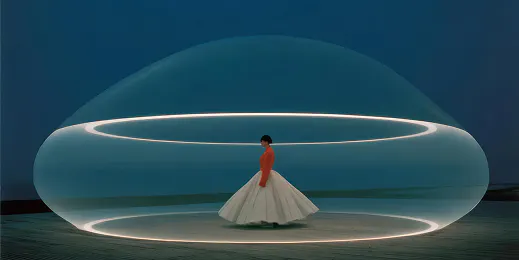


Try the Artlist Original AI model image generator
Type a simple text prompt to generate a cinematic image to use in any creative project.

Inside the Artlist original 1.0 AI Engine
Built on a foundation of proprietary Artlist footage to ensure realism, consistency, and professional quality across every generation.
Adjustable style strength
Maintain full creative control by dialing in the exact influence of the Artlist aesthetic, ranging from a subtle cinematic “grade” to a complete, stylized visual transformation.
Authentic character creation
The Artlist original 1.0 AI is purpose-built for human subjects, excelling at rendering natural skin textures, realistic micro-expressions, and believable eye contact for emotionally resonant images.
Four signature looks
Access curated styles that instantly adjust lighting and contrast to match specific moods, ensuring your visuals feel production-ready and consistent.
Real-world camera physics
The model simulates the physics of film and glass, including anamorphic lens characteristics and depth of field, prioritizing cinematic realism over generic digital art styles.
Frequently asked questions
Artlist Original Model 1.0 is a specialized generative engine trained exclusively on Artlist’s curated library of high-quality footage. Unlike generic models, it is designed to produce photorealistic, commercially safe visuals that mimic professional cinematography, color science, and lens characteristics.
Yes, you can try Artlist Original 1.0 for free. Create a free account to start generating images with Artlist's proprietary model. For details on what's included in Artlist's free trial, click here.
You can access the model via the AI image generator in your creative toolkit. Simply select “Artlist Original 1.0” from the model list, choose your desired style (such as Pop or Grit), set your aspect ratio, and type a prompt. The model is optimized for simple, natural language prompts.
The model was developed by Artlist. It was trained on proprietary, owned content to ensure legal safety for creators and to guarantee that the output meets the high visual standards of the Artlist platform.
Still have questions? We're here to help.