


The Artlist AI voiceover for video creators is designed to fit seamlessly into your creative workflow. Whether you need footage, music, SFX, or AI voice generator, Artlist has everything you need to create story-driven content. Creating this tool was a journey full of creativity, precision, and understanding the needs of brands and creators. Here’s a behind-the-scenes look at how we brought the Artlist AI voiceover to life.
The spark of an idea
Every great project starts with a spark of inspiration. For us, it was all the incredible ways we see brands and creators using Artlist assets to produce videos. From short, engaging social media clips to high-profile ads and epic cinematic storytelling.
Adding voiceover to your videos isn’t just about adding a voice. It’s about enhancing your story. A great voiceover can clarify complex ideas, connect emotionally with your audience, and give your content a professional edge. It also makes your videos more accessible and engaging, guiding viewers through your narrative effortlessly. Plus, with the right voiceover, your videos can resonate across different languages and cultures, boosting your global reach.
Related Posts


We know the benefits of adding voiceover, but the challenge for brands and content creators is doing it efficiently and affordably. Usually, you need to hire a voice actor, book a studio, record, and edit, and any changes will mean more studio time. That’s where high-quality AI voiceover comes in as a game-changer. It provides a quick, cost-effective solution without sacrificing quality, making adding that professional touch to your videos easier than ever.
Creating exclusive voices
We began by brainstorming different characters and voices to fit the content needs of different brands and creators. The first character we brought to life was a suave, mysterious secret agent — think James Bond but with a voice that could be used in sales videos and cinematic trailers alike.
Once we had our secret agent, we expanded our roster of characters, each tailored to specific use cases. We imagined a friendly, approachable guide for educational videos, a dramatic, authoritative voice for epic narrations, and a calm, soothing tone for meditative content.
Check out some voiceover samples we generated using Artlist AI voiceover:
Next, we matched these characters to their use cases. This was a detailed process. We wanted to ensure that each voice was distinct and perfect for its intended purpose. As we roll out more voices, we’re aiming to have a diverse selection of genders, accents, ages, and other characteristics so it’s easy to find the right voiceover to complement any footage or song in your videos.
Bringing characters to life
Artlist is proud to support independent artists around the world in their creative projects, and fair pay for artists is one of our founding principles. To deliver a quality and authentic product for our users, we recruited professional voice actors to record exclusively for our catalog. We’re committed to using AI technology ethically and properly compensating all the voice actors we partner with.


Each actor was matched with a character and a specific use case, so not only did they need to match the sound we were after, but they also recorded their script in a specific tone. Once they had a clear picture of their character, they were able to bring their unique flare and personality to the recordings. For example, Insight was recorded by a female voice actor with an enthusiastic, approachable tone, perfect for explainer videos or commercials. Hear for yourself:
Leveraging AI technology
Creating the perfect AI voiceover isn’t just about great voices. It’s also about using cutting-edge technology. We used advanced AI models to scan and synthesize the voice recordings to ensure that the final product was both natural and versatile. This technology allowed us to maintain the quality and consistency of the voiceovers, making them suitable for creators and brands.
The AI model is trained to understand the nuances of human speech, capturing the subtle inflections and emotions that bring a voice to life. This meticulous attention to detail ensures that the Artlist AI Voiceover sounds as close to a real human voice as possible. You can also use the audio settings to fine-tune your voiceover and get it sounding just the way you want.


The final touches
With the characters, use cases, and languages in place, we focused on the final touches. Our audio engineers worked tirelessly to polish each voiceover, ensuring they were crisp, clear, and perfectly balanced. This stage involved hours of fine-tuning, adjusting, and perfecting every aspect of the recordings.
We also incorporated user feedback into the final product, making adjustments based on what our community wanted. This process, along with the whole team’s development process, allowed us to create a tool that we’re excited to deliver to our community.
“Fine-tuning each voiceover and producing a variety of characters was like crafting a narrative—every detail mattered. We felt it was the right time to add AI Voiceover to Artlist because the technology has reached a point where we can create a tool that meets our high-quality standards. It was also crucial for us to listen to our users’ feedback and provide them with a product that genuinely enhances their workflow and exceeds their expectations.” – Idan Yonas, Content Director, Artlist.
Adding new AI features
Artlist’s AI voiceover tool is constantly being updated so you can always generate studio-quality voiceovers with exceptional clarity on the first try.
Languages, accents, and emotions
Choose from exclusive natural-sounding voices in over 21 languages, with multiple speeds, accents, and emotional tones. English accents include: American, British, Australian, and Indian. Languages include:
- Spanish
- Portuguese
- French
- German
- Japanese
- Italian
- Dutch
- Korean
- Polish
- Russian
- Turkish
- Hindi
- Mandarin
- Cantonese
- Arabic
- Ukrainian
- Vietnamese
- Thai
- Romanian
- Greek
- Czech
- Finnish
- Swedish
Underneath your voiceover script is a dropdown menu for you to select the emotion you want your voiceover to express. You can choose from Neutral, Angry, Sad, Optimistic, Fearful, Disgusted, and Surprised.
Voice effects
Transform your AI-generated voiceovers with distinct voice modifiers — no plugins or post-production required. Choose from effects like Walkie-Talkie, Robotic Assistant, Vintage Radio, and more.
- Choose your effect
- Hover to preview
- Use the slider to control how much effect you want to manipulate your voiceover.
- Click Generate
- Find your new voiceover in the My Voiceovers tab
- Click the info icon to see the voiceover information – the effect you used and the amount

Learn more about the different effects here.
Voice to voice
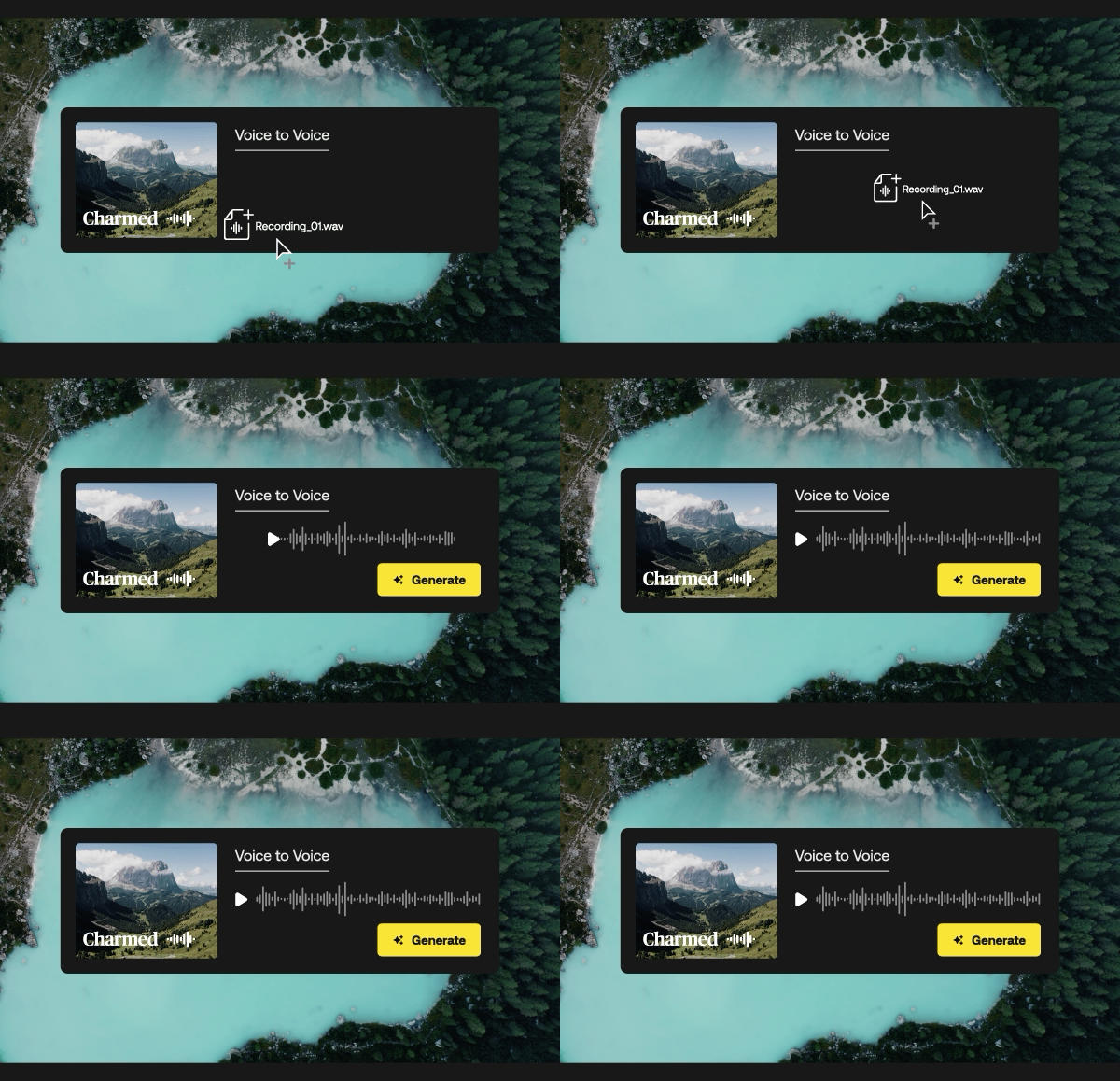
With Voice to Voice, you can upload any voice recording in English to generate the perfect AI voiceover, capturing every emotional range, tone, pronunciation, speed, pacing, and pause. Files can be uploaded in MP3, WAV, or OGG file types. Create more engaging, professional voiceovers in three easy steps.
- Drag & drop or upload your audio file in the Voice to Voice tab
- Select a voice from the catalog
- Click Generate
Say what you want, how you want it, every time. See it in action here.
A new era of creativity
The launch of the Artlist AI Voiceover marked a new era of creativity for our users. With a wide range of high-quality, exclusive voiceovers at their fingertips, creators can elevate their projects and tell their stories like never before.
Whether you’re creating a quick social media video, an in-depth explainer, or a dramatic cinematic trailer, the Artlist AI Voiceover has the perfect voice for you. We’re excited to see how our community uses this AI tool to bring their ideas to life.
Did you find this article useful?


