


When your ideas are moving fast, your tools should too. That’s why Artlist is always evolving, offering the latest AI tools and models in the most organized way.
With the right infrastructure in place, creators can work freely, stay focused, and avoid the friction that often creeps in when the tool stack is complex. The AI ecosystem can be overwhelming, so that’s why we’ve organized it for you in the most seamless way possible.
Choosing the right AI tools
With new AI capabilities popping up everywhere, but few are built for professional workflows. If you are a serious creator, here’s what to look for:
- Speed and efficiency: Speed matters when deadlines are tight. You need tools that generate high-quality results instantly.
- Production-ready quality: High-quality visuals, natural-sounding voiceovers, and polished results are a must.
- Creative control: Features that support your vision, so you can upload assets, customize, and define the style you want.
- Unified workflow: Jumping between tabs kills creativity. The best tools are organized in one place, allowing you to drag, drop, and build smoothly.
- Inspiration: Features should spark new ideas and keep you experimenting.
- Cost-effective: Everything you need is in one place, no need to juggle multiple subscriptions.
Why creators choose Artlist’s AI tools
The Artlist AI Toolkit is the most organized platform for creators who need to move fast, create without limits and achieve professional results consistently. Here’s what sets it apart:
- A unified ecosystem: Artlist combines industry-leading AI tools with the world’s best catalog of royalty-free music, SFX, templates, and LUTs — all in one seamless experience.
- Total creative freedom: Upload your own reference images and audio to guide the AI, ensuring the final output matches your vision perfectly.
- Intuitive: Experience the most organized platform designed by and for people who create every day.
- Always evolving: The platform grows with the industry, giving you the newest capabilities the moment they are available.
- Built for pros: Reliable, high-quality, and scalable enough to handle your most ambitious ideas.


Whether you’re animating your own images, generating visuals from a prompt, or creating studio-quality voiceovers in multiple languages, you’ll find everything you need.
Here’s a comprehensive list of all the tools and capabilities currently available in Artlist — with even more on the way:
- Text to Image
- Image to Image
- Image to Video
- Text to Video
- Video to Video
- AI Music
- Studio-quality AI voiceovers
- Speech to Speech
- Voice effects
- AI Assistant for faster editing
- AI-powered search
- AI-powered Artboards
To start generating AI content for commercial use, you’ll need to subscribe to an Artlist plan that includes AI tools. You can choose the AI Suite plan, which gives you access to both AI voiceover and AI image & video tools, or go all-in with the Max plan, which includes every AI feature plus unlimited access to Artlist’s full catalog. If you’re only looking for voiceover capabilities, there’s also a dedicated AI Voiceover plan.
Each plan comes with flexible credits that you can use however you need to generate AI voiceovers, images, or videos.
If you’re a business with 50+ employees or an agency of any size, the Artlist Max Business plan gives you access to Artlist’s AI tools and stock catalog under a robust business license.
For global teams with enterprise-scale needs, the Artlist Enterprise plan provides a custom, scalable solution that includes Artlist’s AI tools, stock catalog, and a tailored enterprise license.
Let’s take a look at all the AI tools available in Artlist today.
AI image and video
With the AI Video and AI Image Generator on Artlist AI Toolkit, you can upload your own images or turn simple text prompts into scroll-stopping visuals — then animate them with a single click. Whether you’re building content from scratch or adding polish to your next project, it’s a fast, intuitive way to create high-quality assets without leaving your workflow.
Key features:
Text to Image
- Write text prompts in any language to generate stunning AI images. Learn how to get the most out of every visual.
- Below is a list of the most up-to-date text to image and image to image models you can choose from on the Artlist AI Toolkit today:
| Model | Best for |
| Artlist Original 1.0 | Cinema-grade visuals and creative control for high-end storytelling. Aspect ratio: 16:9, 9:16., 1:1 Resolution: 720p, 1080p Max output images: 6 |
| Nano Banana 2 | Google’s AI model for fast, high-quality image generation. Aspect ratio: 1:1, 3:2, 2:3, 3:4, 4:3, 4:5, 5:4, 9:16, 16:9, 21:9, 1:4, 4:1, 1:8, 8:1 Resolution: 512px, 1K, 2K, 4K Max input images: 14; Max outputs: 5 |
| Seedream 5.0 | ByteDance’s net-gen model for production-ready, imaginative visuals. Aspect ratio: 1:1, 4:2, 3:4, 16:9, 9:16, 3:2, 2:3, 21:9 Resolution: 2K, 3K Quality: High, medium, low Max input images: 10; Max outputs: 5 |
| GPT Image 1.5 | Photorealistic infographics and sharp text by OpenAI’s latest model. Aspect ratio: 1:1, 3:2, 2:3 Resolution: 1K Quality: High, medium, low Max input images: 6; Max outputs: 1 |
| Nano Banana Pro | State-of-the-art 4K visuals with flawless typography in any language. Aspect ratio: 1:1, 3:2, 2:3, 3:4, 4:3, 4:5, 5:4, 9:16, 16:9, 21:9 Resolution: 1K, 2K, 4K Max input images: 14; Max outputs: 4 |
| Grok Imagine | Creative, expressive image generation with fast results by xAI Aspect ratio: 1:1, 1:2, 2:1, 2:3, 3:2, 3:4, 4:3, 9:16, 16:9 Max input images: 3; max outputs: 4 |
| Kling 3.0 | Cinematic visuals with strong style consistency for professional use Aspect ratio: 1:1, 2:3, 3:2, 3:4, 4:3, 16:9, 9:16 Resolution: 1K, 2K Max image input 3, max image output 6 Supports Negative Prompt |
| Kling O3 | High fidelity visuals with precise control over fine details Aspect ratio: 1:1, 3:2, 4:3, 9:16, 16:9. 2:3 Resolution: 1K, 2K, 4K Max image input 10; max output 9 |
| Seedream 4.5 | Versatile visuals with premium text rendering across diverse styles. Aspect ratio: 1:1, 3:4, 4:3, 16:9, 9:16, Resolution: 1K, 2K, 4K Max input images: 10; Max outputs: 6 |
| FLUX.2 Pro | Flagship Flux model delivering photorealism and precise color control. Aspect ratio: 4:3, 3:4, 16:9, 9:16, 1:1 Resolution: 1K, 2K Max input images: 10; Max outputs: 6 |
| FLUX.2 Dev | High-fidelity visuals with precise color tuning for pro workflows. Aspect ratio: 4:3, 3:4, 16:9, 9:16, 1:1 Resolution: 1K, 2K Max input images: 10; Max outputs: 6 |
| FLUX.2 Turbo | Fast, polished visuals for high-speed creative projects. Aspect ratio: 4:3, 3:4, 16:9, 9:16, 1:1 Resolution: 1K, 2K Max input images: 10; Max outputs: 6 |
| FLUX.2 Flash | Lightning-fast image generation for real-time visual exploration. Aspect ratio: 4:3, 3:4, 16:9, 9:16, 1:1 Resolution: 1K, 2K Max input images: 10; Max outputs: 6 |
| Nano Banana | Efficient, detailed image creation for high-volume production Aspect ratio: 1:1, 3:2, 2:3, 3:4, 4:3, 4:5, 5:4, 9:16, 16:9, 21:9 Resolution: 1K Max input images: 3; Max outputs: 4 |
| GPT Image 1.0 Mini | Fast, efficient image generation for rapid creative workflows. Aspect ratio: 1:1,2:3,3:2 Resolution: 1K Max input images: 10; Max outputs: 1 |
| Ideogram V3 | Unmatched text precision for graphic design, branding, and marketing. Aspect ratio: 16:9, 9:16, 1:1, 4:3, 3:4 Resolution: 1K Max outputs: 4 |
| Imagen 4.0 | High-speed image generation with industry-leading text rendering. Aspect ratio: 16:9, 9:16, 1:1, 4:3, 3:4 Resolution: 1K Max outputs: 4 Supports Negative Prompt |
| Imagen 4.0 Ultra | Maximum photorealism with 2K, print-ready image quality by Google. Aspect ratio: 16:9, 9:16, 1:1, 4:3, 3:4 Resolution: 2K Max outputs: 4 Supports Negative Prompt |
| Hunyuan Image V3 | Complex visuals with accurate text for smart infographic designs. Aspect ratio: 16:9, 9:16, 1:1, 4:3, 3:4 Resolution: 1K Max outputs: 4 Supports Negative Prompt |
| ImagineArt 1.5 | Hyper-realistic, natural visuals for marketing and product mockups. Aspect ratio: 1:1, 3:1, 1:3, 16:9, 9:16, 4:3, 3:4, 3:2, 2:3 Resolution: 1K Max outputs: 2 |
| Z-Image Turbo | Ultra-fast, high-fidelity images ideal for portraits and characters. Aspect ratio: 1:1, 4:3, 3:4, 16:9, 9:16 Resolution: 1K, 2K Max outputs: 4 |
Image to Image
| Model | Best for |
| GPT Image 1.5 | Photorealistic infographics and sharp text by OpenAI’s latest model. Aspect ratio: 1:1, 3:2, 2:3 Resolution: 1K Quality: High, medium, low Max input images: 6; Max outputs: 1 |
| Seedream 4.5 | Versatile visuals with premium text rendering across diverse styles. Aspect ratio: 1:1, 3:4, 4:3, 16:9, 9:16, Resolution: 1K, 2K, 4K Max input images: 10; Max outputs: 6 |
| Nano Banana | Efficient, detailed image creation for high-volume production Aspect ratio: 1:1, 3:2, 2:3, 3:4, 4:3, 4:5, 5:4, 9:16, 16:9, 21:9 Resolution: 1K Max input images: 3; Max outputs: 4 |
| Nano Banana 2 | Google’s AI model for fast, high-quality image generation. Aspect ratio: 1:1, 3:2, 2:3, 3:4, 4:3, 4:5, 5:4, 9:16, 16:9, 21:9, 1:4, 4:1, 1:8, 8:1 Resolution: 512px, 1K, 2K, 4K Max input images: 14; Max outputs: 5 |
| Nano Banana Pro | State-of-the-art 4K visuals with flawless typography in any language. Aspect ratio: 1:1, 3:2, 2:3, 3:4, 4:3, 4:5, 5:4, 9:16, 16:9, 21:9 Resolution: 1K, 2K, 4K Max input images: 14; Max outputs: 4 |
| Grok Imagine | Creative, expressive image generation with fast results by xAI Aspect ratio: 1:1, 1:2, 2:1, 2:3, 3:2, 3:4, 4:3, 9:16, 16:9 Max input images: 3; Max outputs: 4 |
Kling 3.0 | Cinematic visuals with strong style consistency for professional use Aspect ratio: 1:1, 2:3, 3:2, 3:4, 4:3, 16:9, 9:16 Resolution: 1K, 2K Max image input 3, max image output 6 Supports Negative Prompt |
| Kling O3 | High fidelity visuals with precise control over fine details Aspect ratio: 1:1, 3:2, 4:3, 9:16, 16:9. 2:3 Resolution: 1K, 2K, 4K Max image input 10; max output 9 |
| FLUX.2 Pro | Flagship Flux model delivering photorealism and precise color control. Aspect ratio: 4:3, 3:4, 16:9, 9:16, 1:1 Resolution: 1K, 2K Max input images: 10; Max outputs: 6 |
| FLUX.2 Dev | High-fidelity visuals with precise color tuning for pro workflows. Aspect ratio: 4:3, 3:4, 16:9, 9:16, 1:1 Resolution: 1K, 2K Max input images: 10; Max outputs: 6 |
| FLUX.2 Turbo | Fast, polished visuals for high-speed creative projects. Aspect ratio: 4:3, 3:4, 16:9, 9:16, 1:1 Resolution: 1K, 2K Max input images: 10; Max outputs: 6 |
| FLUX.2 Flash | Lightning-fast image generation for real-time visual exploration. Aspect ratio: 4:3, 3:4, 16:9, 9:16, 1:1 Resolution: 1K, 2K Max input images: 10; Max outputs: 6 |
| GPT Image 1.0 Mini | Fast, efficient image generation for rapid creative workflows. Aspect ratio: 1:1,2:3,3:2 Resolution: 1K Max input images: 10; Max outputs: 1 |
| Wan 2.6 Image | Diverse, stylized images for visual exploration and animation. Aspect ratio: 4:3, 3:4, 16:9, 9:16, 1:1 Resolution: 1K Max input images: 2; Max outputs: 2 |
Text to Video
Generate video using text prompts. Choose your text to video model to get the best fit for your project.
| Model | Best for |
| Kling 2.6 Pro | Top-tier visuals, motion, and audio for pro-level productions. Aspect ratio: 16:9, 9:16, 1:1 Duration: 5, 10 seconds Resolution: 1080p (Full HD) Audio: With or without Supports Start Frame, Negative Prompting, Guidance Scale |
| Sora 2 | Ultra-realistic visuals with synced audio, ideal for social content. Duration: 4, 8, or 12 seconds Aspect ratio: Landscape (16:9); Portrait (9:16) Resolution: 720p (HD) Audio: With |
| Sora 2 Pro | OpenAI’s top model built for cinematic realism and high-end content. Duration: 4, 8, or 12 seconds Aspect ratio: Landscape (16:9); Portrait (9:16) Resolution: 720p (HD) or 1080p (Full HD) Audio: With |
| Veo 3.1 | Google’s leading model with perfect audio sync and prompt precision. Duration: 4, 6, 8 seconds Resolution: 720p, 1080p, 4K Aspect ratio: 16:9, 9:16 Audio: With or without Supports Start/End Frame, Negative Prompting |
| Veo 3.1 Fast | Fast storytelling with synced audio and advanced creative control. Duration: 4, 6, 8 seconds Resolution: 720p, 1080p, 4K Aspect ratio: 16:9, 9:16 Audio: With or without Supports Start/End Frame, Negative Prompting |
| Grok Imagine | Fast multi-shot video generation with synced audio by xAI. Resolution: 480p, 720p Aspect ratio: 1:1, 2:1, 2:3, 3:2, 3:4, 4:3, 9:16, 16:9 Duration: 1-15 seconds Audio: With Supports Start Frame |
Kling 3.0 | Cinematic video with rich narrative continuity and native audio Aspect ratio:16:9, 9:16, 1:1 Duration: 3-15 seconds Resolution: 1080p Audio: with or without Model: Pro and Standard Shot type: Customize, Intelligent Supports Start/ End Frame, Negative Prompt |
Kling O3 | High-fidelity visuals with precise control over complex scenes Aspect ratio: 16:9, 9:16, 1:1 Duration: 3-15 seconds Resolution: 1080p Audio: with or without Model: Pro and Standard Supports Start/ End Frame |
| Wan 2.6 | Versatile artistic visuals for multi-shot storytelling and exploration. Duration: 5, 10, 15 seconds Resolution: 720p (HD) or 1080p (Full HD) Aspect ratio: 16:9, 9:16, 1:1, 4:3, 3:4 Audio: With Supports Start Frame, Negative Prompting |
| Kling 2.5 Turbo Pro | Fast, cinematic results with a deep understanding of complex prompts. Duration: 5,10 seconds Resolution: 1080p (Full HD) Aspect ratio: 16:9, 9:16, 1:1 Supports Start/End Frame, Negative Prompting, Guidance Scale |
| Seedance 1.5 Pro | Precise audio-visual sync with diverse artistic styles. Duration: 4-12 seconds Resolution: 480p, 720p Aspect ratio: 21:9, 16:9, 4:3, 1:1, 3:4, 9:16 Audio: With or without Supports Start/End Frame |
| Kling 1.6 | High-quality video with sharp detail and smooth motion. Duration: 5, 10 seconds Resolution: 720p (HD) or 1080p (Full HD) Aspect ratio: 16:9, 9:16, 1:1 Supports Start/End Frame, Negative Prompting, Guidance Scale |
| Kling 2.1 Master | Studio-quality visuals with enhanced depth and cinematic motion. Duration: 5, 10 seconds Resolution: 1080p (Full HD) Aspect ratio: 16:9, 9:16, 1:1 Supports Start/End Frame, Negative Prompting, Guidance Scale |
| Hailuo 2.3 | Stylized visuals with expressive characters, perfect for animation. Duration: 6, 10 seconds Resolution: 768p Aspect ratio: 16:9 Supports Start Frame |
| Hailuo 2.3 Pro | Cinematic detail and diverse styles for high-impact ads. Duration: 5 seconds Resolution: 1080p Aspect ratio: 16:9 Supports Start Frame |
| Seedance 1.0 Pro Fast | Pro results and fast iteration for consistent, multi-shot videos. Duration: 1-12 seconds Resolution: 480p, 720p, 1080p Aspect ratio: 21:9, 16:9, 4:3, 1:1, 3:4, 9:16 Supports Start Frame |
| LTX 2.0 Pro | Reliable, production-grade results for fast, professional workflows. Duration: 6,8,10 seconds Resolution: 1080p, 2K, 4K Aspect ratio: 16:9 Audio: With or without Supports Start Frame, Negative Prompting |
Image to Video
Want more creative freedom and personalization? Upload your own images or animate any generated image into an AI video.
| Model | Best for |
| Kling 2.6 Pro | Top-tier visuals, motion, and audio for pro-level productions. Aspect ratio: image dependent Duration: 5, 10 seconds Resolution: 1080p Audio: With or without Supports Start Frame, Negative Prompting, Guidance Scale |
| Kling 1.6 | High-quality video with sharp detail and smooth motion. Duration: 5, 10 seconds Resolution: 720p (HD) or 1080p (Full HD) Aspect ratio: image dependent Supports Start/End Frame, Negative Prompting, Guidance Scale |
| Kling 3.0 | Cinematic video with rich narrative continuity and native audio Aspect ratio: image dependent Duration: 3-15 seconds Resolution: 1080p Audio: with or without Shot type: Customize, Intelligent Model: Pro and Standard Supports Start/ End Frame, Negative Prompt |
| Kling O3 | High-fidelity visuals with precise control over complex scenes Aspect ratio: image dependent Duration: 3-15 seconds Resolution: 1080p Audio: with or without Model: Pro and Standard Supports Start/ End Frame |
| Sora 2 | Ultra-realistic visuals with synced audio, ideal for social content. Duration: 4, 8, or 12 seconds Aspect ratio: Landscape (16:9); Portrait (9:16) Resolution: 720p (HD) Audio: With |
| Sora 2 Pro | OpenAI’s top model built for cinematic realism and high-end content. Duration: 4, 8, or 12 seconds Aspect ratio: Landscape (16:9); Portrait (9:16) Resolution: 720p (HD) or 1080p (Full HD) Audio: With |
| Grok Imagine | Fast multi-shot video generation with synced audio by xAI. Resolution: 480p, 720p Aspect ratio: 1:1, 2:1, 2:3, 3:2, 3:4, 4:3, 9:16, 16:9 Duration: 1-15 seconds Audio: With Supports Start Frame |
| Veo 3.1 | Google’s leading model with perfect audio sync and prompt precision. Duration: 4, 6, 8 seconds Resolution: 720p, 1080p, 4K Aspect ratio: 16:9, 9:16 Audio: With or without Supports Start/End Frame, Negative Prompting |
| Veo 3.1 Fast | Fast storytelling with synced audio and advanced creative control. Duration: 4, 6, 8 seconds Resolution: 720p, 1080p, 4K Aspect ratio: 16:9, 9:16 Audio: With or without Supports Start/End Frame, Negative Prompting |
| Wan 2.6 | Versatile artistic visuals for multi-shot storytelling and exploration. Duration: 5, 10, 15 seconds Resolution: 720p (HD) or 1080p (Full HD) Aspect ratio: image dependent Audio: With Supports Start Frame, Negative Prompting |
| Kling 2.5 Turbo Pro | Fast, cinematic results with a deep understanding of complex prompts. Duration: 5,10 seconds Resolution: 1080p (Full HD) Aspect ratio: image dependent Supports Start/End Frame, Negative Prompting, Guidance Scale |
| Seedance 1.5 Pro | Precise audio-visual sync with diverse artistic styles. Duration: 4-12 seconds Resolution: 480p, 720p Aspect ratio: 21:9, 16:9, 4:3, 1:1, 3:4, 9:16 Audio: With or without Supports Start/End Frame |
| Seedance 1.0 Pro Fast | Pro results and fast iteration for consistent, multi-shot videos. Duration: 1-12 seconds Resolution: 480p, 720p, 1080p Aspect ratio: 21:9, 16:9, 4:3, 1:1, 3:4, 9:16 Supports Start Frame |
| Kling 2.1 | Sharp visuals and natural motion for high-quality storytelling Duration: 5 or 10 seconds Resolution: 720p (HD) or 1080p (Full HD) Aspect ratio: image dependent Supports Start/End Frame |
| Hailuo 2.3 | Stylized visuals with expressive characters, perfect for animation. Duration: 6, 10 seconds Resolution: 768p Aspect ratio: image dependent Supports Start Frame |
| Hailuo 2.3 Pro | Cinematic detail and diverse styles for high-impact ads. Duration: 5 seconds Resolution: 1080p Aspect ratio: image dependent Supports Start Frame |
| LTX 2.0 Pro | Reliable, production-grade results for fast, professional workflows. Duration: 6,8,10 seconds Resolution: 1080p, 2K, 4K Aspect ratio: 16:9 Audio: With or without Supports Start Frame, Negative Prompting |
| Hailuo 2.3 Fast | Realistic motion and stylized visuals for quick experimentation. Duration: 6, 10 seconds Resolution: 768p Aspect ratio: image dependent Supports Start Frame |
| Hailuo 2.3 Fast Pro | Fast results with diverse artistic styles and cinematic detail Duration: 5, 10 seconds Resolution: 1080p Aspect ratio: image dependent Supports Start Frame |
Video to Video
Use a reference video to direct motion, and edit details. This is a new level of control for AI video.
| Model | Best For |
| Kling O3 Video Edit | Advanced video to video editing to swap props, styles, and lighting. Resolution: 1080p Audio: with or without Model: Pro and Standard Input: 1 3-10 sec video, 4 images; Output: 10 seconds |
| Kling 3.0 Motion Control | Animate any character by replicating motion from a reference video. Resolution: 1080p Audio: with or without Model: Pro and Standard Input: 1 video, 1 image; Output: 30 seconds |
Upscale
- Upscale your AI videos to 4K and get the highest resolution.
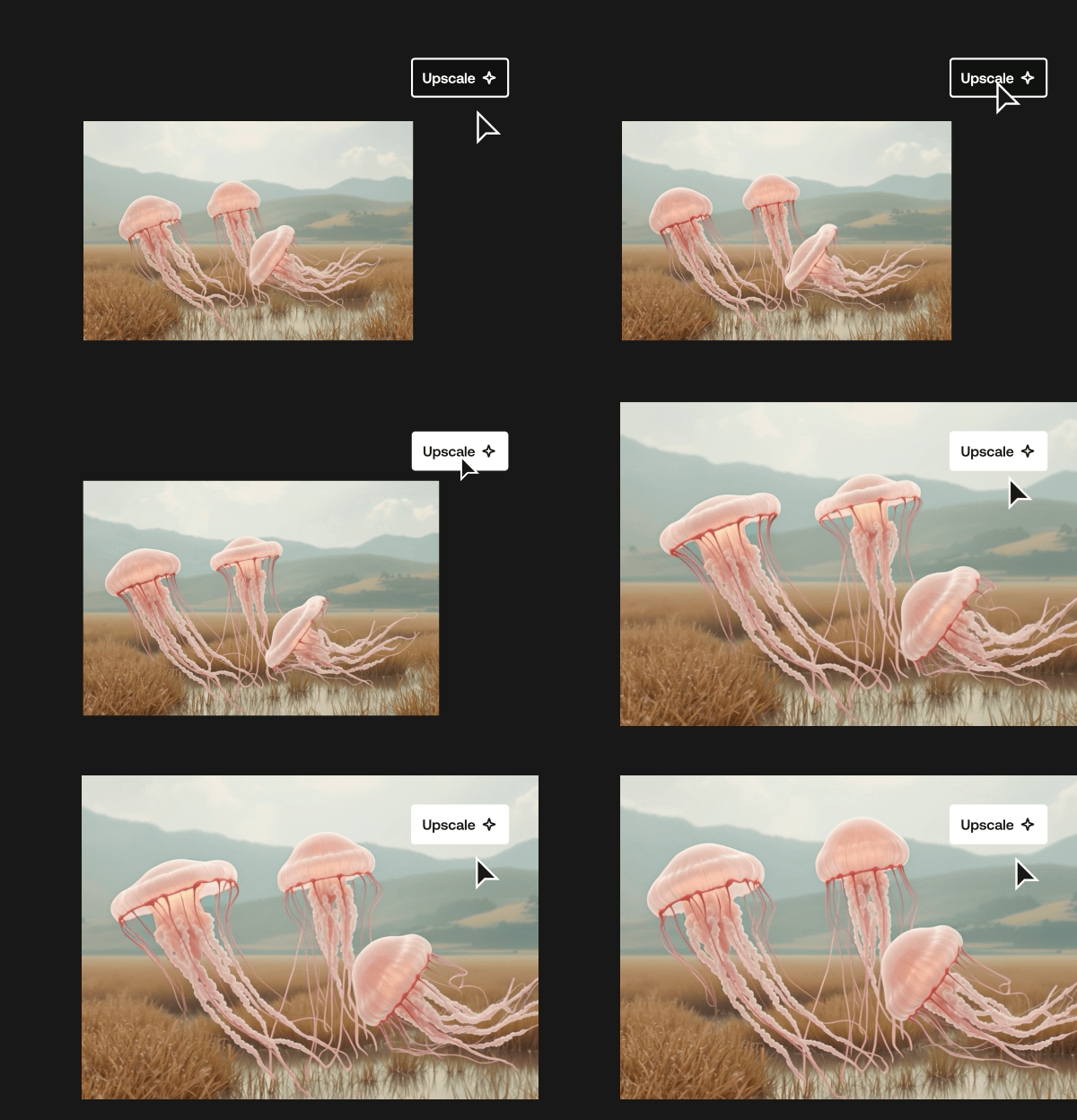
Check out some of the ways top creators and brands use the AI image and video generator and get inspired.
AI Music
Generate professional, commercial-ready songs in any language, any genre, directly from text.
| Model | Best For |
| Lyria 3 Pro | Pro-grade fill-length tracks with advanced lyric and tempo control. Duration: 30 sec, 1 min, 1:30, 2 min, 3 min Vocals: Auto lyrics, Custom Lyrics, Instrumental Artlist Sound: Enhance your song with Artlist’s professional production for a polished, high-end sound. Genre: Pop, Folk, Funk, Jazz, Lofi, Rock, Blues, Latin, Ambient, Country, Hip-Hop, Children, Rnb/ Soul, Cinematic, Classical, Corporate, Electronic Mood: Sad, Epic, Chill, Funny, Happy, Dramatic, Uplifting, Mysterious Theme: Commercial, Documentary, Social Media, Film & cinema Tempo: Slow, Slow-Med, Medium, Med-Fast, Fast |
| Lyria 3 | Pro-grade fill-length tracks with advanced lyric and tempo control. Duration: 30 sec, 1 min, 1:30, 2 min, 3 min Vocals: Auto lyrics, Custom Lyrics, Instrumental Artlist Sound: Enhance your song with Artlist’s professional prodcution for a polished, high-end sound. Genre: Pop, Folk, Funk, Jazz, Lofi, Rock, Blues, Latin, Ambient, Country, Hip-Hop, Children, Rnb/ Soul, Cinematic, Classical, Corporate, Electronic Mood: Sad, Epic, Chill, Funny, Happy, Dramatic, Uplifting, Mysterious Theme: Commercial, Documentary, Social Media, Film & cinema Tempo: Slow, Slow-Med, Medium, Med-Fast, Fast |
AI Voiceover
Artlist is constantly updating its AI voiceover with the latest models, giving you the tools to create high-quality narration with exclusive voices, supporting over 70 languages. Whether you’re creating audio content for YouTube, client projects, podcasts, or trailers, AI voiceover will tell your story exactly how you want it to sound.
Text to Speech: Artlist’s AI voiceover tool lets you generate studio-quality voiceovers with exceptional clarity on the first try. Choose from exclusive natural-sounding voices, with multiple speeds, accents, and emotional tones. Here are some of the models you can choose from:
| Model | Best For |
| Cartesia Sonic 2 | Natural-sounding voiceovers with a wide emotional range. Perfect for expressive, impactful storytelling. |
| MiniMax 02 HD | Studio-quality voiceovers with stable, natural-sounding clarity. Best for projects that demand consistency. |
| Eleven v3 | Dramatic delivery that responds to emotional cues in your prompt. Best for creative control and experimentation. |
| Eleven Multilingual v2 | High-quality, reliable narration with authentic delivery. Built for consistent storytelling and long-form audio. |
| Cartesia Voice Changer | A speech to speech model that transforms recorded audio into a new voice while preserving the original performance, emotion, and timing. |
- Speech to Speech: Say what you want, how you want it, every time. With Speech to Speech, you can upload a voice recording and generate a voiceover that captures your exact tone, emotion, pronunciation, and pacing.
- Voice effects: A powerful, built-in feature that transforms your AI-generated voiceovers with distinct audio styles — no plugins or post-production required. Choose from effects like Walkie-Talkie, Robotic Assistant, Vintage Radio, and more.
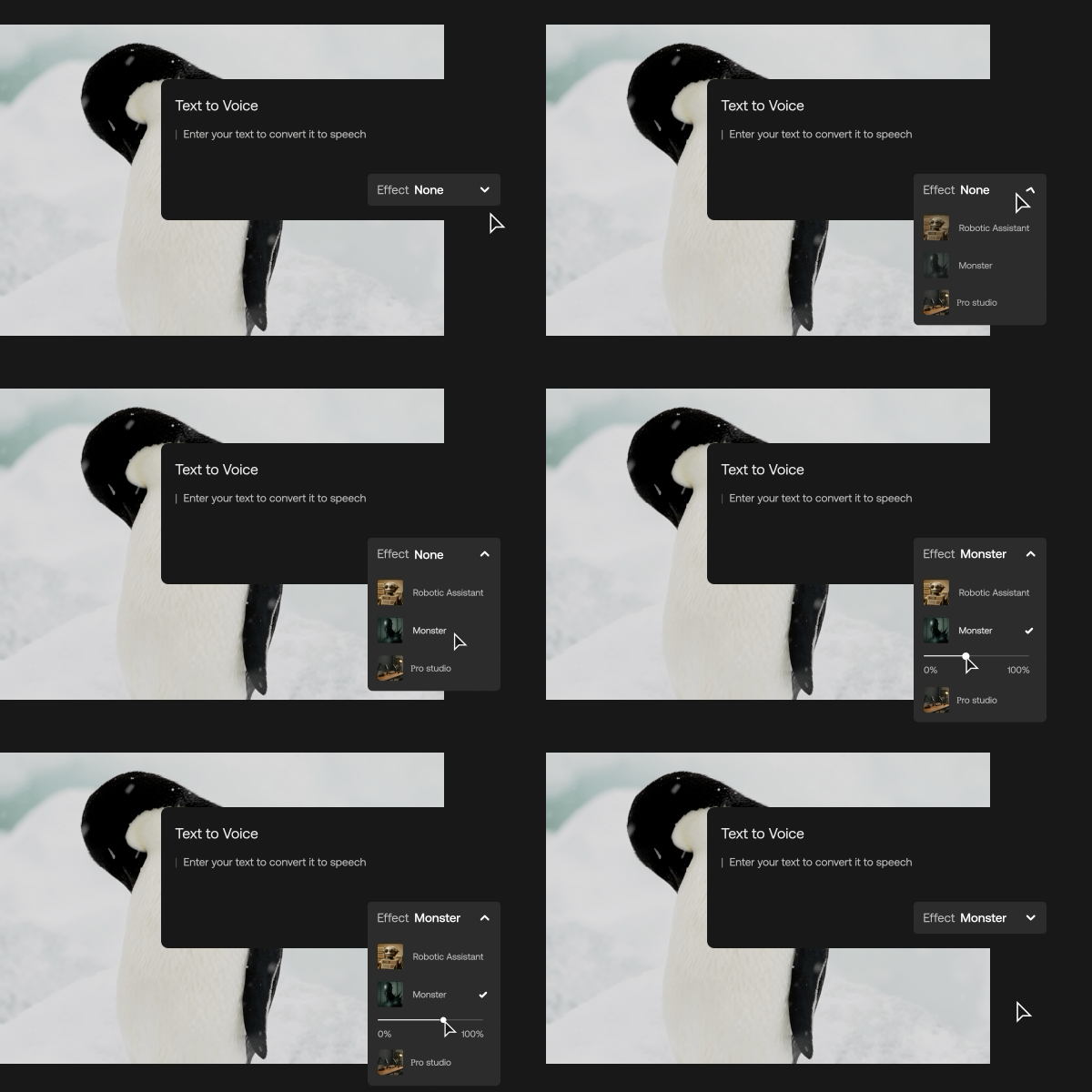
Here’s how creators are using the Artlist AI voiceover tool to narrate their projects.
Hybrid sessions
You can now combine all asset types within a single session and work on their project end-to-end without switching contexts, so you can create and edit AI Image, Video, and Voiceover within the same session.
The grid is fully draggable and resizable, allowing users to customize their workspace. Quickly filter asset types and adjust the size of each section to fit your workflow.
AI Assistant for Premiere Pro
With Artlist, you get more than generative AI — you also get smart editing tools that help speed up your workflow and bring more polish to your projects. The AI Assistant for Premiere Pro includes two powerful features designed to save time and enhance your storytelling, right inside your timeline.
Key features:
- Silence removal: Cut the dead air instantly. This tool automatically detects and removes unwanted silences from your audio, helping you create a smoother, more professional flow without the manual cleanup.
- Auto zoom: Need to emphasize a key moment? Auto zoom uses AI to identify important parts of your video and applies dynamic zoom effects to draw the viewer’s attention — perfect for adding energy and focus to your edits.
Whether you’re working on a tight deadline or just want to skip repetitive tasks, these tools make editing faster, cleaner, and way more efficient.
AI-powered search
Finding the right asset shouldn’t break your flow. With AI-powered search on Artlist, you can describe exactly what you’re looking for in your own words and get spot-on results in seconds. This smart tool understands creative intent, not just keywords, making it easier than ever to find the perfect music, footage, or image for your project. It even picks up on natural phrasing, typos, and nuanced ideas, so you can stop rewording and start creating. Just think it, search it, and keep moving. Watch this video to see how it works.

AI-powered Artboards
Artboards are your creative workspace inside Artlist — a place to curate, organize, and preview everything you love in one spot. You can drag in music, footage, templates, and even AI-generated content to start building out your project visually. And with AI-powered suggestions, you’ll discover related assets that match your style and flow, without breaking focus. Whether you’re planning a scene, pitching an idea, or just saving inspiration for later, Artboards make it easy to stay organized and keep your creativity moving.
All your AI tools, all in one place
The future of content creation is already here, and it’s built for creators like you. From generating images and animating them instantly, to creating expressive, studio-quality voiceovers, to faster and easier editing, Artlist’s AI tools are built to support every part of your creative process.
Get started by signing up for a free trial and start creating today.
Get started with the Artlist Max Business plan, or Contact Sales to learn more about the Artlist Enterprise plan.
Did you find this article useful?


