


Using different camera angles is an effective way to bring a different tone to your storytelling. Depending on where you position your camera and how you shoot your subjects, you can make your audience feel entirely differently about them and your story. Getting to grips with your camera angles is an absolute must.
Broadly speaking, camera angles can be ‘high’, ‘low’ or eye-level, but these can be divided further. Depending on how high or low you go, or if you choose to shoot an eye-level shot from straight-on, behind, or somewhere in between, they each give a different feeling to your videos. This stays true whether you’re filming on set or building scenes using virtual or AI workflows, using AI video models like Seedance 2.0
In this post, we’ll go over some of the essential camera angles every creator needs to know and see their impact. We’ll see examples from famous films and clips from Artlist that you can use in your video to create the desired effect.
Bird’s-eye view or aerial shot
Let’s start high up above. To achieve a bird’s-eye view or an aerial shot, you will need a drone or even a helicopter. Aerial footage can be used as establishing shots, but it can also be quite abstract and disorienting, so you need to think carefully about how best to use it. When you shoot from high above, it makes everything moving at ground level seem a bit slower. This could be great for something contemplative or give your audience a moment of pause, but maybe not so good for a frantic high-speed chase.
You can also create bird’s eye view visuals from AI too. Using models like Kling 3.0, and including “bird’s eye view” in your prompt, can give you images in seconds.
Prompt: “Extreme bird’s-eye view from directly above, 90-degree vertical top-down shot. A giant chessboard city where buildings are shaped like chess pieces, people below move around them like pawns. Futuristic feel.”

Overhead shot
Overhead shots come somewhere between bird’s-eye view and high-angle shots. You will look down directly onto your subject, but be slightly closer than in a bird’s-eye view. They’re a standard when it comes to making food videos, or in fact, any kind of demonstration video, giving clear sight of what’s going on, but are important in a storytelling situation, too.
There’s a surprising versatility to overhead shots. First, they can give your audience a sense of being all-seeing or even all-knowing. While they might be intrusive, they can also be intimate, like in the ice scene from Michel Gondry’s Eternal Sunshine of the Spotless Mind.
They also convey movement very well, and that’s why legendary director Busby Berkley incorporated plenty of overhead shots in his choreographed scenes.
High-angle shot
A high-angle shot is the classic establishing shot, but you can put them to work in more ways than just that. When you want to give your audience the feeling that they are in control and that the subject is somehow inferior or disempowered, shoot from higher up. It will make your subject appear smaller than she or he really is.
You can see an excellent example for this in the Coen Brothers’ film Fargo (which recently celebrated its 25th anniversary), where the extremely high-angle shot enhances the effect of insignificance and loneliness of the film’s tragic hero:
Remember: a high-angle shot can come just above someone’s head, from the corner or a room, out of a window or at the top of a building. There’s a lot of variation in ‘high’, and that can bring a lot of variation to your filmmaking.
Eye-level shot
Eye-level shots are one of the staple camera angles in filmmaking. They’re neutral and allow your audience to form their own conclusions about the subject. You aren’t being suggestive; everything is on the level. Obviously, this is important if you’re filming an interview or documentary, but it’s also a handy storytelling technique because ambiguity is valuable.
Check out the powerful emotional ambiguity in the ending scene of Christopher Nolan’s Inception:

When you shoot at eye level, you will want to think not just about the camera angle going up and down but also about the camera angle moving around your subject too. Will you shoot straight on, looking her or him in the eye? That’s very intimate. It works well for emotional scenes or important appeals and is very effective combined with a shallow depth of field. You probably wouldn’t want an interview subject looking directly into the camera, but instead at the interviewer.
In this date scene from Whiplash, you can see the effect of each camera placement. It starts with a side view shot that gives us the observational feel and then goes to the over-the-shoulder to give a sense of connection. When the conversation starts to get a bit confrontational, it switches to close-up shots of each of the characters, breaking the tension by going back to shooting them from the side.
Low-angle shot
When you shoot from below–whether it’s from just below the chin or from knee-level–you instantly empower your subject over the audience. And you make them appear larger than they actually are.
In this scene from Quentin Tarantino’s Django Unchained, watch how the low-angle shot gives the rebelling Django power.
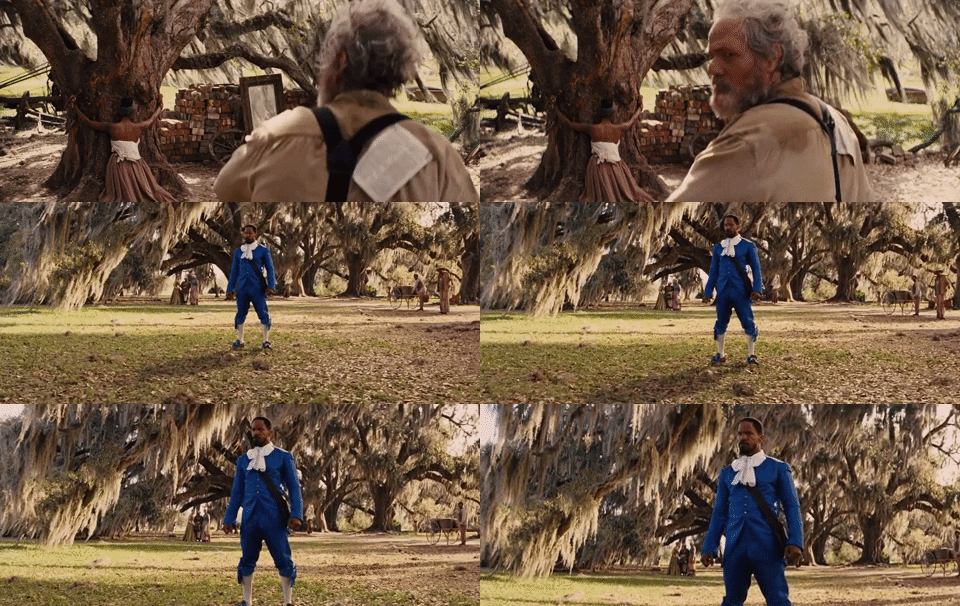
By subtly combining low and high-angle shots in the same scene, you can give your audience visual cues about who is in control and who is being dominated.
In this clip from The Black Panther, you can see how combining low-angle and high-angle shots can show the changing power relationship between the characters.
When using AI video or image tools, describing the camera’s height in your prompt is important. For example, adding in “low-angle medium shot” will give a very different effect than an “eye-level portrait”. Think of it as having the same storytelling rules, even when the camera is digital.
For example, changing the camera angle from “low-angle” to “eye-level portrait” takes one prompt:


Worm’s-eye view
A worm’s-eye view is also known as a ground-level shot. Imagine that you are a worm, looking up at the world. These shots really emphasize the size of anything going upwards, whether it’s a flower or a skyscraper and have a very strong immersive effect. If you want to intensify the immersive effect, then have a look at a wide-angle lens.
In this scene from Tarantino’s Inglourious Basterds, the worm’s-eye view shot of Brad Pitt and Eli Roth gives the Jewish guerilla soldiers superiority over the nazis.
Dutch angle (or Dutch tilt)
A Dutch angle, or Dutch tilt, is when you deliberately skew the horizon in a scene. When done properly, it produces a sense of confusion or disorientation in the audience. But, you do need to be deliberate with this. If it’s at an angle of just a few degrees, it might feel like a mistake and be plain irritating rather than evocative. Be bold here!
Watch how this Dutch angle-heavy scene from Terry Gilliam’s 12 Monkeys really conveys the wacky atmosphere of the asylum and delivers the sense of disorientation.
Camera angles in AI production workflows
When you shoot with a physical camera, angles are something you have to feel and test out. Maybe you’ll need to move the tripod a bit higher, or maybe tilt the camera slightly more to get the effect you’re looking to create.
In AI and virtual production, you need to describe how the camera shoots, as most AI tools default to generating an image with an eye-level angle.
Using AI image and video tools before you even pick up a camera allows you to easily test different camera angles. For example, if you’re creating a product video, and you want to see if it’s better that the hero shot projects power or intimacy. With just a few clicks, you can easily test:
- An eye-level close up
- Slight low-angle medium shot
- Overhead detail shot
Base prompt: “A sparkling white unicorn with a flowing rainbow mane standing in a glowing magical forest at dawn. Soft golden light filters through tall ancient trees. Subtle magical sparkles drifting in the air. In the foreground, on a moss-covered stone, stands a clean, unbranded white dishwashing liquid bottle with no label or logo, minimalist design. [Camera angle goes here].”


Then, using your results you can see what works best, before even booking a studio or building a set, or using AI for your entire piece and not even needing to use a studio or set at all.
AI models like Flux 2.0 and Kling O3 are great at following exact camera directions, and the more specific you are about height, distance, and framing, the better your results will be.
Some AI video models, such as Veo 3.1, also allow you to upload an image and generate a video from it:
Prompt: “The unicorn excitedly head butts the white bottle, which spills a rainbow liquid that quickly spreads over the mossy rock. Everything the liquid touches turns to a rainbow colour. Gold specks of light shimmer in the liquid.”
Mastering perspective across all types of video creation
If you’re a little hesitant about trying too many different angles, or being too extravagant, shooting B-roll is the perfect opportunity to experiment with your camera angles. You might not use what you’ve shot, but then again, you might. And you will definitely get a feel for what different camera angles bring to your filmmaking.
If you want to take your use of camera angles a step further, consider how they will combine with different cinematic lenses. We’ve already looked at the immersive effect of the worm’s-eye view with the wide-angle lens, but think about how a fish-eye lens could change things; or when you should use a telephoto.
As AI video tools like Seedance 2.0 become more realistic, you need to describe camera height and angle more carefully. Technology changes, but perspective still controls how a scene feels.


Finally, remember that camera angles in filmmaking are an important tool, but it’s easy to overuse them. Too many different angles or quick changes can be disorienting for the audience or remind them that they are watching a film and not get them fully immersed in the experience.
Ready to put these angles into practice? Try building and testing your shots inside Artlist’s AI Toolkit, and create rough ideas and final-ready videos in just a few clicks.
Did you find this article useful?


